
 Help keep Byter free
A free, simple GlassWire alternative
If you used GlassWire mainly to see how much data you use, Byter is a free, lighter alternative for Windows and Mac. It isn’t a firewall and doesn’t show per-app traffic, so pick based on what you need.
GlassWire is a network monitor and firewall for Windows with per-app graphs and alerts. Lots of people install it for one thing: to see how much data their laptop uses. If that’s you, a smaller tool may suit you better.
What you get
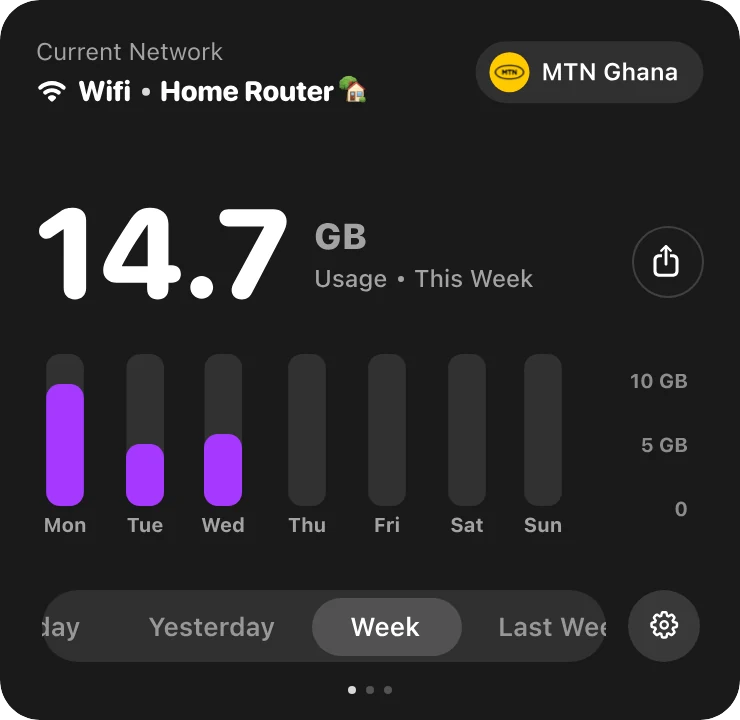
Usage per network
See which Wi‑Fi or hotspot used your data.
Live speed in the tray
Plus a built-in speed test.
Light and free
No ads, no account, no paid tiers.
Mac too
The same app on Windows and Mac.
Byter and GlassWire compared
| Byter | GlassWire | |
|---|---|---|
| Data usage history | Yes, per network | Yes, per app |
| Firewall / blocking apps | No | Yes |
| Per-app usage | No | Yes |
| Mac version | Yes | No |
| Price | Free | Free version, paid plans |
GlassWire’s features change over time, so check their site for the latest.
Choose Byter if…
- You mainly want to know how much data you use, and on which network.
- You work from a hotspot or capped plan and want alerts.
- You want something light, free, on Windows and Mac.
Choose GlassWire if…
- You need a firewall or want to block specific apps.
- You need to see which app used the data.
Mac and Windows
Byter for Mac
- System
- macOS 14 Sonoma or later
- Chips
- Apple silicon and Intel
- Lives in
- The menu bar
- Price
- Free
Byter for Windows
- System
- Windows 10 and 11
- Chips
- 64-bit (x64)
- Lives in
- The taskbar (system tray)
- Price
- Free
Set it up in a minute
- 1
Download
Get Byter for Mac or Windows. It’s free.
- 2
Open it
On a Mac, drag it to Applications. On Windows, install it from the Microsoft Store.
- 3
That’s it
Byter appears in your menu bar or taskbar and starts counting. No account.
- 4
Click any time
See your usage, speed and networks in one click.
What Byter doesn’t do
Byter counts how much data goes through each network. It doesn’t show usage per app and it doesn’t block apps from using the internet. That’s on purpose: it never looks inside your traffic. For per-app numbers, Activity Monitor on a Mac and Task Manager or Settings on Windows can show some of that.
Questions
Is there a free alternative to GlassWire?
Yes. Byter is free on Windows and Mac for tracking data usage per network, with live speed and a speed test. It doesn’t include a firewall.
Does Byter work on Mac like GlassWire?
GlassWire is Windows only. Byter runs on both Mac and Windows.
More about Byter
- Data usage monitorByter is a free data usage monitor for Mac and Windows. See how much data each Wi‑Fi network and hotspot uses, with daily, weekly and monthly history.
- Hotspot data trackerSee exactly how much of your phone’s hotspot data your laptop uses. Byter tracks hotspot usage separately from Wi‑Fi, free on Mac and Windows.
- Network speed monitorByter shows your live download and upload speed in the Mac menu bar or Windows taskbar, with a live dial and speed history. Free.
- Speed test appTest your download speed, upload speed and latency from the menu bar or taskbar. Byter is a free speed test app for Mac and Windows.
- Usage per Wi‑Fi networkByter splits your data usage by Wi‑Fi network and hotspot, so you know exactly which connection used what. Free for Mac and Windows.
- TripMode alternativeWant to know how much hotspot data your laptop uses? Byter is a free alternative to TripMode for tracking data on Mac and Windows (no app blocking).
Looking for tips instead? Read the guides.

See where your data goes
Free for Mac and Windows. No ads, no account.