
 Help keep Byter free
Track how much data your laptop uses on a hotspot
Your phone shows how much data the hotspot shared, but not what your laptop did with it. Byter tracks your laptop’s hotspot usage separately from Wi‑Fi, with history and alerts.
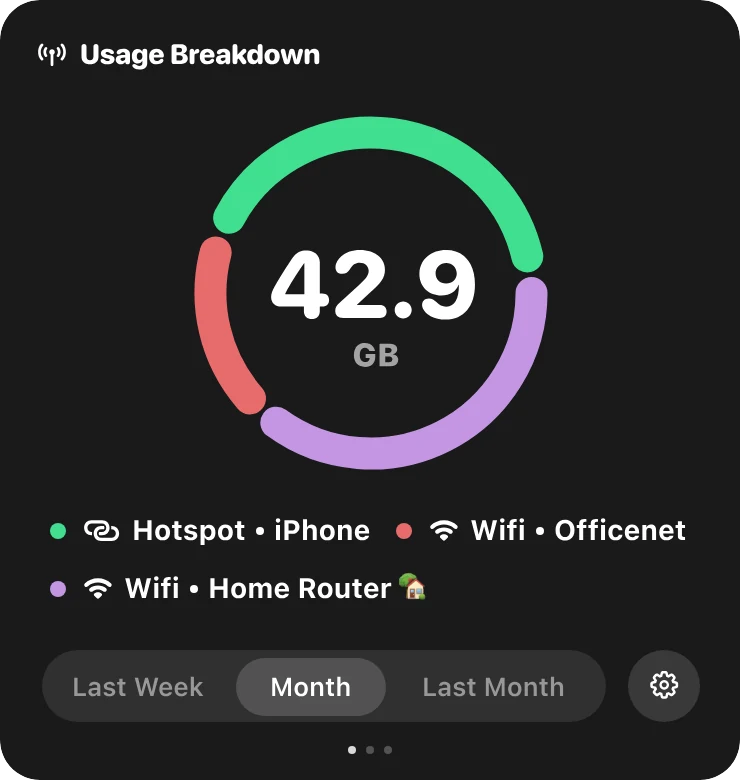
Working from a phone hotspot is normal in many places, and so is a bundle disappearing in a day. The laptop is usually the reason: system updates, cloud sync and video use far more data than a phone does. Byter shows you how much, while it’s happening.
What you get
Hotspot on its own line
Never mixed in with your free Wi‑Fi.
Every hotspot by name
Two phones or two SIMs show up separately.
Hotspot connected
A notification when you join a hotspot, so you remember it’s paid data.
High usage alerts
A heads-up when something big starts downloading.
Live speed
See a download happening before it finishes your data.
Today, this week, this month
Check your hotspot usage for any period.
Make your hotspot data last longer
Turn on Low Data Mode (Mac) or set the hotspot as a metered connection (Windows), pause automatic updates and cloud sync, and lower video quality. More in why your laptop uses so much data.
Mac and Windows
Byter for Mac
- System
- macOS 14 Sonoma or later
- Chips
- Apple silicon and Intel
- Lives in
- The menu bar
- Price
- Free
Byter for Windows
- System
- Windows 10 and 11
- Chips
- 64-bit (x64)
- Lives in
- The taskbar (system tray)
- Price
- Free
Set it up in a minute
- 1
Download
Get Byter for Mac or Windows. It’s free.
- 2
Open it
On a Mac, drag it to Applications. On Windows, install it from the Microsoft Store.
- 3
That’s it
Byter appears in your menu bar or taskbar and starts counting. No account.
- 4
Click any time
See your usage, speed and networks in one click.
What Byter doesn’t do
Byter counts how much data goes through each network. It doesn’t show usage per app and it doesn’t block apps from using the internet. That’s on purpose: it never looks inside your traffic. For per-app numbers, Activity Monitor on a Mac and Task Manager or Settings on Windows can show some of that.
Questions
How much data does a laptop use on a hotspot?
It depends on what you do, but background updates alone can be several gigabytes, and HD video can use up to about 3 GB an hour. Byter shows your real number.
Can I see how much hotspot data my laptop used today?
Yes. Byter keeps a history for each network, so you can check today, yesterday, this week or any dates you pick.
Does Byter count my phone’s own data use?
No. Byter runs on your laptop, so it counts what the laptop uses. Your phone’s settings show the phone’s own use.
More about Byter
- Data usage monitorByter is a free data usage monitor for Mac and Windows. See how much data each Wi‑Fi network and hotspot uses, with daily, weekly and monthly history.
- Network speed monitorByter shows your live download and upload speed in the Mac menu bar or Windows taskbar, with a live dial and speed history. Free.
- Speed test appTest your download speed, upload speed and latency from the menu bar or taskbar. Byter is a free speed test app for Mac and Windows.
- Usage per Wi‑Fi networkByter splits your data usage by Wi‑Fi network and hotspot, so you know exactly which connection used what. Free for Mac and Windows.
- GlassWire alternativeLooking for a GlassWire alternative to track data usage? Byter is a free, lightweight tray app for Windows and Mac that tracks data per network.
- TripMode alternativeWant to know how much hotspot data your laptop uses? Byter is a free alternative to TripMode for tracking data on Mac and Windows (no app blocking).
Looking for tips instead? Read the guides.

See where your data goes
Free for Mac and Windows. No ads, no account.